


I spent the last week running an experiment: Fitbit Air on my right wrist, Apple Watch Series 11 on my left. The goal was simple — figure out whether Google’s screen-free $100 tracker actually holds up against a full-blown smartwatch, or whether the lower price comes with compromises that matter.
The value proposition is hard to ignore on paper. A hundred dollars gets you a device that syncs cleanly into the new Google Health app with zero subscription required. Stack that against Whoop’s roughly $200 yearly fee, or Oura’s $350+ ring plus its $6/month add-on, and the Fitbit suddenly looks like a steal. But pricing alone doesn’t tell the whole story, so here’s what a week of side-by-side wear actually revealed.
Build and Everyday Feel
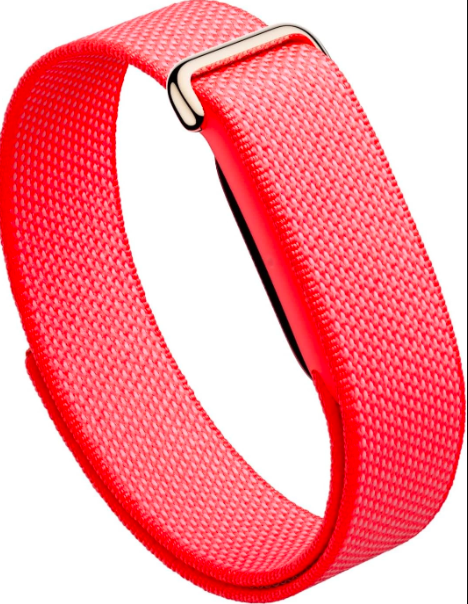
There isn’t a ton to say about the design itself — restraint is clearly the intent. That said, one small annoyance kept popping up: the band snagged on my sleeve constantly while getting dressed, something that never happened with the Apple Watch. My guess is that having two stacked layers (the puck plus the band) just gives fabric more to catch on. It’s minor, but it adds up over a week.
On the plus side, the Berry colorway grew on me fast. I’m usually not drawn to bold color choices on wearables, but this one struck a nice balance. The Air is also light enough that I’d genuinely forget it was on my wrist at night — which, for a sleep tracker, is exactly the point. And stepping away from constant notifications turned out to be a nice change of pace; it layered well even alongside a smartwatch rather than replacing it outright.
Battery and Charging
This is where the Fitbit Air pulls ahead clearly. Google’s official estimate is seven days per charge, and in practice it outperformed that. Tracking it closely over four days, the battery dropped from 70% to 29% — roughly 10% per day, which puts realistic battery life closer to 8 or 9 days.
The charging puck itself works fine, using a two-pin connector that clicks into place securely. My one gripe: the cable is permanently attached to the charger, meaning it’s yet another dedicated cable to pack. Competitors like Coros have moved to small charging adapters that work with any USB-C cable, which is a smarter approach.
Step Tracking
For basic step counting, the Fitbit Air and Apple Watch lined up closely during a straightforward walking test. Since I’ve previously confirmed the Apple Watch tracks steps accurately, the close match is a solid sign the Fitbit is doing the same.
Where Workout Tracking Gets Complicated
This is the category where the Fitbit Air’s screen-free design should theoretically shine. Without a display draining the battery, it can sample heart rate every 5 seconds during normal activity, and that frequency jumps to once per second during detected workouts. For comparison, the Apple Watch typically checks every 2 to 5 minutes outside of workouts, also ramping up to 1-second intervals once exercise starts.
That’s a meaningful technical edge — but the data quality left me with real doubts.
During normal walks, where I typically log 10,000+ steps a day, heart rate readings stayed sensible, peaking around 100 bpm. When I climbed stairs at the office on two separate days, the Fitbit correctly flagged the spike — heart rate jumped to roughly 137 bpm during the climb, then settled back down once I leveled off into a regular walking pace. That tracked with what I’d expect, and it repeated consistently across both days.
Then the gym sessions happened. Over three separate days, I did functional strength training that the Apple Watch logged without issue. The Fitbit missed every single one. My theory is that the stop-start nature of strength training — quick heart rate spikes followed by rest periods between sets — doesn’t fit whatever pattern the Fitbit’s auto-detection is looking for.
The strangest result came from an evening electric scooter ride home. Riding a scooter shouldn’t elevate heart rate meaningfully at all, but the Fitbit logged a workout anyway, initially misclassifying it as cycling (I manually corrected it to “electric scooter” once I found that option in Google Health). The bigger issue was the heart rate data itself: the app showed readings near 150 bpm, which simply didn’t match how the ride felt. Realistically, I doubt it went past 120.
My best guess is that the Fitbit leaned on GPS-derived speed to estimate exertion rather than measuring heart rate directly — essentially modeling what your heart should be doing at that speed, rather than what it’s actually doing. I’ve run into something similar with Garmin devices lacking a proper e-bike mode, where selecting standard “bike” produced wildly inflated heart rate estimates because the watch was extrapolating from speed instead of sensing actual heart activity.
I can’t prove that’s exactly what’s happening here, but it’s enough to make me question heart rate accuracy across the board — and to know that you’ll likely be doing manual workout corrections in Google Health more often than you’d like.
Sleep Tracking
Sleep is the metric I personally weight most heavily, so this section mattered most to me. The good news: the Fitbit Air nailed wake-up timing with impressive consistency — on par with the Apple Watch, and notably better than some Garmin devices I’ve tested previously, which have missed wake times in the past. That kind of precision is genuinely useful if you’re trying to build a consistent sleep schedule.
Where things diverge sharply is sleep stage breakdown. Across two tracked nights, the difference was stark: the Fitbit Air logged 1 hour 27 minutes of deep sleep on night one versus just 28 minutes from the Apple Watch. Night two showed a similar gap — roughly 90 minutes from the Fitbit against 32 minutes on the Apple Watch.
That’s not a small discrepancy, and it’s a useful reminder that sleep-stage algorithms across the wearable industry are still far from standardized — two devices on the same wrist (well, same body) at the same time can produce wildly different conclusions about deep sleep.
On the feature side, I appreciated the sleep efficiency metric and the built-in sleep meditation and ambient sound library in Google Health, which felt noticeably more developed than Apple Health’s comparatively sparse offering. Heart rate variability numbers also diverged meaningfully between the two devices, reinforcing that any single metric here should be taken with some skepticism.
The Verdict
Quirks aside, this was an enjoyable week of testing. The understated design, uninterrupted heart rate sampling, and reliable sleep-duration tracking are all genuine strengths, and the new Google Health app impressed me even without touching its AI coaching features.
If you’re after a lifestyle tracker rather than a serious fitness instrument, the Fitbit Air earns its $100 price tag — just go in knowing its workout detection and heart rate estimates during certain activities (especially anything wheel-based) need a skeptical eye and the occasional manual correction.